- JavaScript 100%
| Filename | Latest commit message | Latest commit date |
|---|---|---|
| .github | ||
| airauctioneer | ||
| servicenow | ||
| .editorconfig | ||
| .eslintignore | ||
| .eslintrc.json | ||
| .gitignore | ||
| .prettierrc.json | ||
| CHANGELOG.md | ||
| LICENSE | ||
| README.md | ||

ServiceNow Tampermonkey Scripts
A collection of Tampermonkey userscripts that enhance the ServiceNow Knowledge Base experience.
Author: Joan Marc Riera
Vision & Principles
Documentation is pivotal to any company to work in a standardised way. The consequences of the work done during these last 3 hours on this would have an impact on the 600 users as long as the people doing the documentation keep it tidy and useful.
To achieve this, we follow these core principles:
- No external links: We don't want links going outside the ServiceNow Knowledge Base; keeping users within the ecosystem ensures they don't get lost.
- No short documents: Fragmented "thin" content is avoided. It requires extra clicks and often leads to dead ends.
- Table of Contents: All documentation must have a Table of Contents (using the native ServiceNow Knowledge Base tool) to ensure easy scanning.
- Value-Driven Linking: The linking between each Knowledge Base article must make sense and add clear value to the journey of the user.
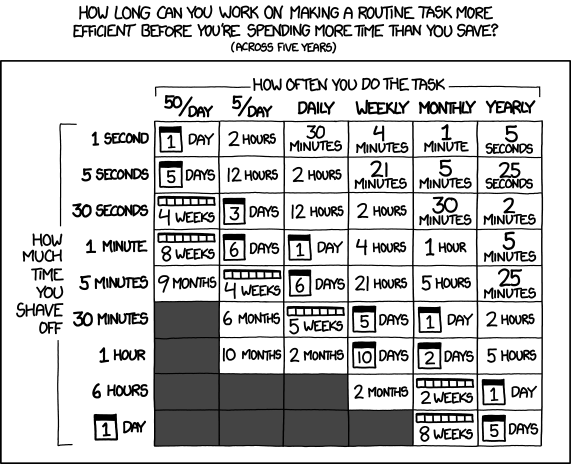 Source: XKCD 1205
Scripts
| Script | Description | Version |
|---|---|---|
| KB Graph View | Obsidian-like interactive graph of linked KB articles | 1.3 |
| KB Reverse Links | Show which KB articles and tasks reference the current article | 1.2 |
| KB Obsidian Export | Export KB articles to Obsidian-flavoured Markdown | 1.3 |
| KB Health Badge | Show a quick freshness/ownership health badge for the current article | 1.1 |
| KB Link Linter | Detect malformed, duplicate, and dead KB links in the current article | 1.1 |
| KB Link Preview | Hover preview with health status and content snippet | 1.3 |
| KB Content Merger | Copy clean HTML from linked articles directly in the editor | 1.1 |
| KB Content Quality Checker | Detect thin content, missing ToC, and readability levels | 1.2 |
| KB List Enricher | Enrich KB search results with metrics (in/out links, words) | 1.2 |
Prerequisites
-
Install Tampermonkey for your browser:
-
ServiceNow access — you need to be logged into your ServiceNow instance. The scripts work on any instance (they match
*/kb_view.do*and*/kb_article.do*).
Installation
Option A — Install from file (recommended)
- Open Tampermonkey in your browser and go to the Dashboard.
- Click the Utilities tab.
- Under Import from file, choose the
.user.js/.scriptfile you want to install. - Tampermonkey will show the script source — click Install.
Option B — Copy & paste
- Open Tampermonkey Dashboard → click the
+tab to create a new script. - Delete the template code.
- Paste the full contents of the script file.
- Press Ctrl+S / Cmd+S to save.
Option C — Install directly from GitHub
Click the raw file link for each script below. Tampermonkey will detect it and offer to install:
servicenow-kb-graph-view.user.jsservicenow-kb-reverse-links.user.jsservicenow-kb-obsidian-export.user.jsservicenow-kb-health-badge.user.jsservicenow-kb-link-linter.user.jsservicenow-kb-link-preview.user.jsservicenow-kb-content-merger.user.jsservicenow-kb-thin-content-detector.user.jsservicenow-kb-list-enricher.user.js
Note: For the direct-install to work the file must have a
.user.jsextension and be served as raw content.
Scripts in Detail
KB Graph View
File: servicenow/servicenow-kb-graph-view.user.js
An interactive, Obsidian-style graph visualisation that shows how ServiceNow Knowledge Base articles link to each other. Built with D3.js.
Features
- Force-directed graph — central node (current article) with linked KB articles around it
- Expand on demand — double-click any node to fetch its linked articles via the ServiceNow Table API
- Tree view — toggle to a collapsible tree that highlights duplicate/convergent links with badges
- Expand All / Collapse All — bulk-expand the next level of links or fold the tree back up
- Open in new tab — right-click a node or click the footer link to open the article
- Drag, zoom & pan — full interactivity on the graph canvas
- Resizable panel — drag the bottom-right corner to resize
- Background title fetching — article titles are fetched in parallel so labels always show
KB_NUMBER - Title
Screenshots
Graph view:
Tree view:
Reverse links:
How it works
- Navigate to any ServiceNow KB article (
kb_view.doorkb_article.do). - A purple "KB Graph View" button appears in the bottom-right corner (after ~3s).
- Click it to open the graph panel.
- Double-click a node to expand it (fetches linked articles via the REST API).
- Right-click a node to open that article in a new tab.
- Use the footer buttons to switch between Graph and Tree views, Fit to View, Reset Zoom, or Expand All.
Requirements
- ServiceNow Table API access (
/api/now/table/kb_knowledge) — requires read permission on thekb_knowledgetable. - The script uses your existing browser session (
window.g_cktoken) for authentication; no credentials are stored.
KB Reverse Links
File: servicenow/servicenow-kb-reverse-links.user.js
Shows which other KB articles and tasks (incidents, catalog tasks, etc.) reference the currently viewed KB article — the "incoming links" complement to the Graph View's outgoing links.
Features
- Reverse KB references — queries the
kb_2_kbrelationship table to find KB articles that link to the current one - Task references — queries the
m2m_kb_tasktable to find incidents, catalog tasks, change requests, and other tasks that reference this article - Auto schema discovery — automatically detects the field names on
kb_2_kb(which vary by ServiceNow instance) via a one-time discovery query - Clickable results — click any row or the ↗ icon to open the referenced article or task in a new tab
- Task type badges — each task shows its type (Incident, Catalog Task, Change, etc.)
- Graceful error handling — each section loads independently, so if one table is inaccessible the other still works
- Refresh button — re-fetch the latest reverse links without reloading the page
How it works
- Navigate to any ServiceNow KB article (
kb_view.do,kb_article.do, oresc?id=kb_article). - A sky-blue "Reverse Links" button appears in the bottom-right corner (after ~3s).
- Click it to open the reverse links panel.
- The script resolves the article's
sys_id, then queries both relationship tables in parallel. - Results are displayed in two sections: KB Articles (purple dots) and Tasks (amber dots).
Requirements
- ServiceNow Table API access to
kb_knowledge,kb_2_kb, andm2m_kb_tasktables. - If
kb_2_kbis not accessible, the KB references section will show an error message while the tasks section still works (and vice versa). - Uses your existing browser session (
window.g_cktoken) for authentication.
KB Obsidian Export
File: servicenow/servicenow-kb-obsidian-export.user.js
Exports the current ServiceNow KB article as a clean Markdown file ready for Obsidian, with proper [[wikilinks]] to other KB articles.
Features
- Extracts the article body from the page (no UI chrome or scripts)
- Converts internal KB links to Obsidian
[[KB_NUMBER|Label]]wikilinks - Preserves links to ServiceNow incidents, catalogs, and Google Docs
- Downloads as a
.mdfile named after the KB number
How it works
- Navigate to any ServiceNow KB article.
- An "Export to Obsidian (Clean MD)" button appears in the bottom-right corner.
- Click it to download the Markdown file.
KB Health Badge
File: servicenow/servicenow-kb-health-badge.user.js
Displays a compact health card in the top-right corner of KB article pages with a clear status: Fresh, Review Soon, Stale, or Unknown.
Features
- Computes health based on article age and workflow state
- Shows owner, last modified information, version, and state at a glance
- Works on standard KB pages and ESC KB article view
- Auto-refreshes periodically so relative timestamps stay current
How it works
- Navigate to any ServiceNow KB article (
kb_view.do,kb_article.do, oresc?id=kb_article). - A KB Health card appears in the top-right corner.
- Status thresholds:
- Fresh: last update within 90 days
- Review Soon: 91-180 days old, or non-published working states
- Stale: older than 180 days, or retired/pending retirement states
Requirements
- No extra API permissions needed; the script reads existing KB page metadata already rendered in the page.
KB Link Linter
File: servicenow/servicenow-kb-link-linter.user.js
Analyzes links in the current KB article and reports link-quality issues before they become support problems.
Features
- Detects malformed KB links (e.g. missing/invalid
sysparm_article=KB...) - Finds duplicate KB targets (same KB linked multiple times)
- Finds duplicate URLs in the article body
- Validates KB targets against
kb_knowledgeand flags dead links - Highlights links pointing to retired/pending-retirement KB articles
How it works
- Navigate to any ServiceNow KB article (
kb_view.do,kb_article.do, oresc?id=kb_article). - Click the orange "KB Link Linter" button in the bottom-left corner.
- Review the report sections:
- Malformed KB Links
- Duplicate KB Targets
- Duplicate URLs
- Dead KB Targets
- Retired Targets
- Use Refresh to re-run after editing content.
Requirements
- Table API read access to
kb_knowledgeis needed for dead-link and retired-target checks. - If API access is unavailable, structural checks still run and the report shows a validation warning.
KB Link Preview
File: servicenow/servicenow-kb-link-preview.user.js
Shows a snippet and health status when hovering over KB article links, preventing unnecessary navigation.
Features
- Instant Snippet — hover over any KB link to see the first 300 characters of the article
- Rich Formatting — preserves bold, italics, and strong tags in the preview
- Integrated Health — shows the "Fresh/Stale" status of the linked article directly in the popup
- Smart Positioning — automatically adjusts popup position to stay within browser bounds
KB Content Merger
File: servicenow/servicenow-kb-content-merger.user.js
Adds a "Copy Content" button next to KB links in the ServiceNow Knowledge editor to facilitate merging multiple short articles into larger "pillar" articles.
Features
- One-Click Copy — adds a 📋 button next to all KB links in the editor
- Clean HTML Extraction — fetches and copies the article's
textfield directly to the clipboard - Visual Feedback — button changes to a green checkmark upon successful copy
KB Content Quality Checker
File: servicenow/servicenow-kb-thin-content-detector.user.js
Automatically analyzes articles to identify "documentation noise", missing structure, and readability issues.
Features
- Word Count Scale — color-coded badges for Critical Noise (<100 words), Very Thin (<200), and Thin (<300)
- Readability Scorer — calculates the Flesch-Kincaid Grade Level (Simple, Average, Complex) to ensure content is accessible
- Native ToC Checker — flags long articles (>500 words) that are missing a native ServiceNow Table of Contents
- Dead End Detection — flags articles that contain no outgoing links to other KB articles
- Lean Motivation — highlights candidates for merging or deletion to keep the Knowledge Base lean
KB List Enricher
File: servicenow/servicenow-kb-list-enricher.user.js
Enriches the Knowledge Base home page and search results with live metrics for each article, aiding in the "lean documentation" audit.
Features
- In-Link Counter (📥) — shows the number of explicit relationships pointing to this article
- Out-Link Counter (📤) — shows how many other KB articles are linked within this article's body
- Word Counter (📝) — displays the article's total word count, highlighting "Critical Noise" (<100 words) in red
- Broken Link Detection (❌) — flags malformed or empty links within the article body
- Batch Processing — efficiently fetches data for multiple articles in the list view
Troubleshooting
| Problem | Solution |
|---|---|
| Buttons don't appear | Wait a few seconds for ServiceNow to finish rendering. Check that Tampermonkey is enabled and the script is active for the current URL. |
| "Session expired" error | Refresh the ServiceNow page to get a new session token, then reopen the graph. |
| API errors (403/404) | Ensure your ServiceNow role has read access to kb_knowledge. For reverse links, you also need access to kb_2_kb and m2m_kb_task. |
| Graph is empty | The article may not contain links to other KB articles. Check the article body for <a> tags pointing to kb_view.do or kb_article. |
